- Rotation fixed
- Deskewed
- Scan cleaned
- 2 pages to 1 document
01
Prepare
We fix rotation, deskew, clean the scan, and staple loose pages into complete documents.
Document extraction
TitleTools prepares every image, reads every word, extracts every title field, checks its own work, formats it to your plant's rules, and delivers it straight into your plant. No keying backlog.
Go-forward posting
Every day's recordings, extracted, checked and posted. Run it fully automated or as a first pass in front of your keyers.
Gap fill
Missing years? Missing document types? We fill them from the county images and post them under your rules, so they match what's already in your plant.
Full plant builds
Starting a county from scratch? We process the full back-file with the same engine and build the plant from the ground up.
01
We fix rotation, deskew, clean the scan, and staple loose pages into complete documents.
02
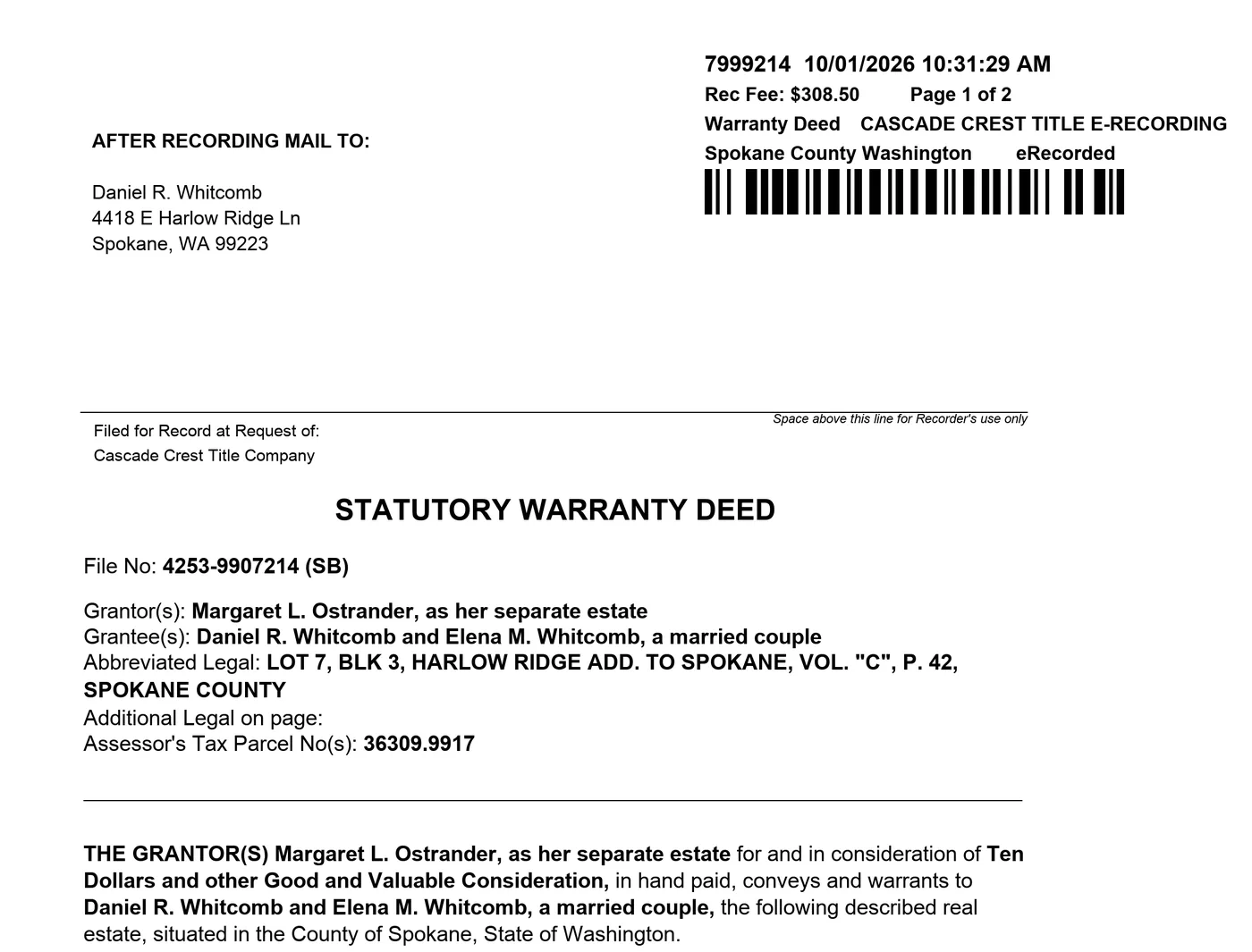
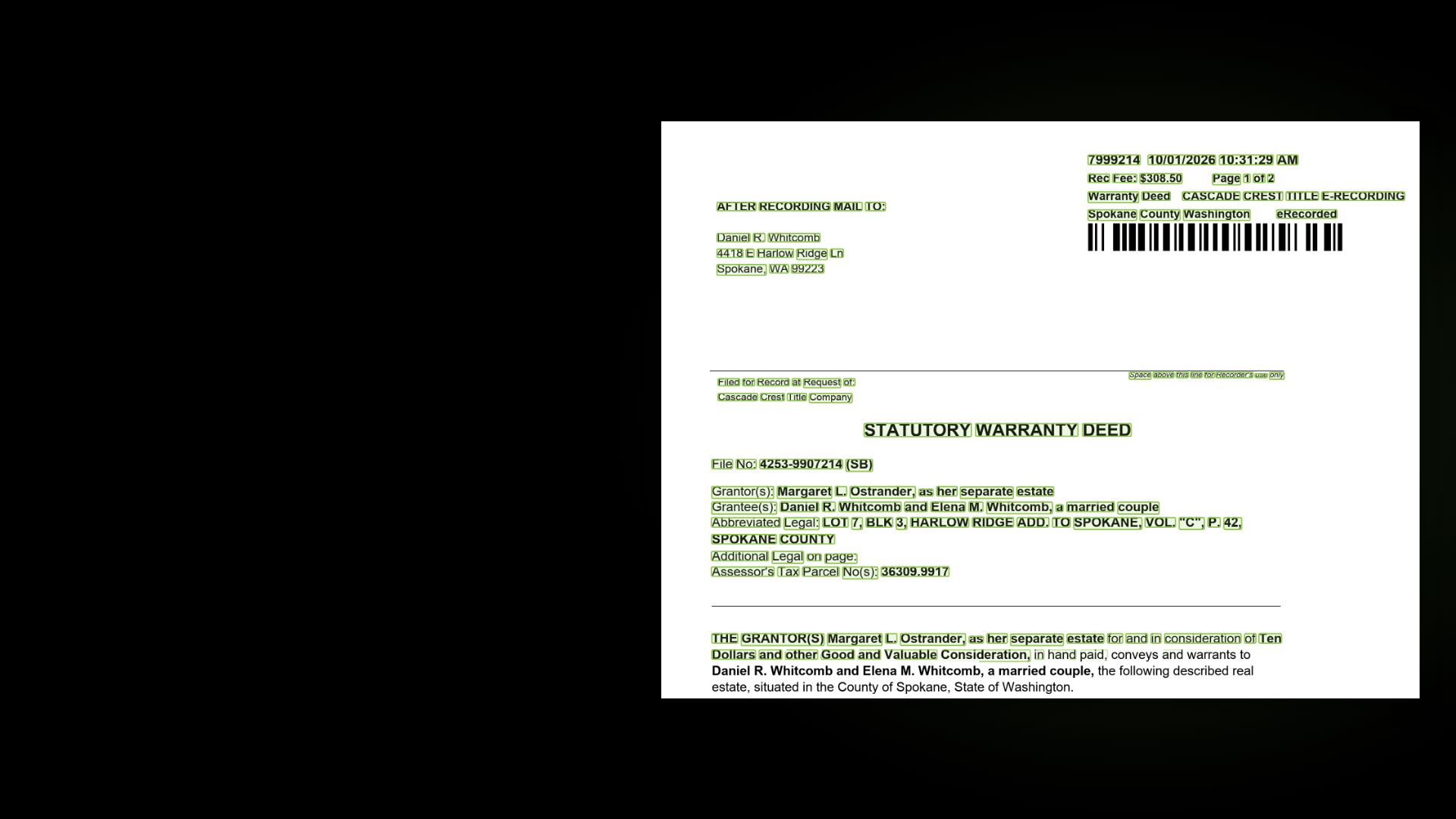
Every word on every page gets a position and a box. Not just title-specific language. Every word.
03
Our extraction is trained on millions of title documents. It knows each document type and the structures that belong to it: legal descriptions, subdivisions, abstracts and surveys. Grantors and grantees. Dates, consideration, and addresses. Every value ties back to the page.
1234568 7
703 · Handwritten
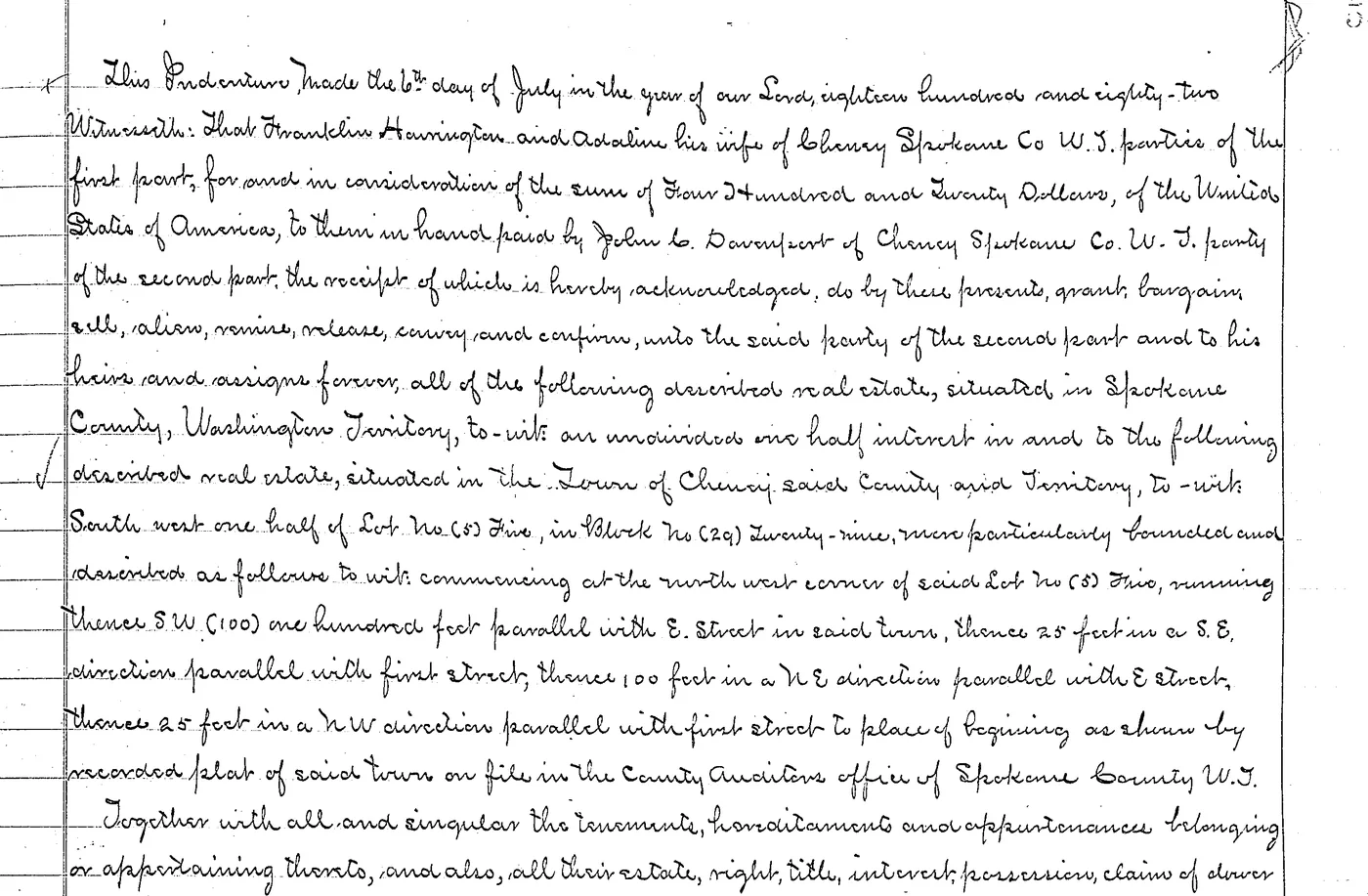
Typed or handwritten, it reads them both with high accuracy. Cursive included. Old documents and modern ones, back to patent.
 123456
Confidence
04
Every read gets a rating and a comment. Weak scans go back for another pass, and a separate QC agent verifies every value.
05
Name order, punctuation, document numbers, consideration. Everything your keyers did by hand, applied after extraction. Change a rule and rerun it at no extra cost.
Your title plant
5 documents
06
Straight into your title plant, or as files for pickup or direct feed. Go-forward documents are cleaned, extracted, checked and posted within minutes of receiving the images. PropertySync customers land in a review batch through our direct API adapter.
Scale
Millions
Millions of documents
Built to scale.
Minutes
Go-forward, posted
Cleaned, extracted, checked and posted within minutes of receiving the images.
10x
An order of magnitude faster
Full plant builds versus traditional keying.
Extraction is one part of the plant. The same system reads the old books, indexes tract books, and builds rules from plats.

Franklin Harrington and Adaline Harrington
TitleTools reads handwritten documents back to patent, cursive included. Every word is boxed on the page, and the grantor, grantee, date, and legal come off as real fields.
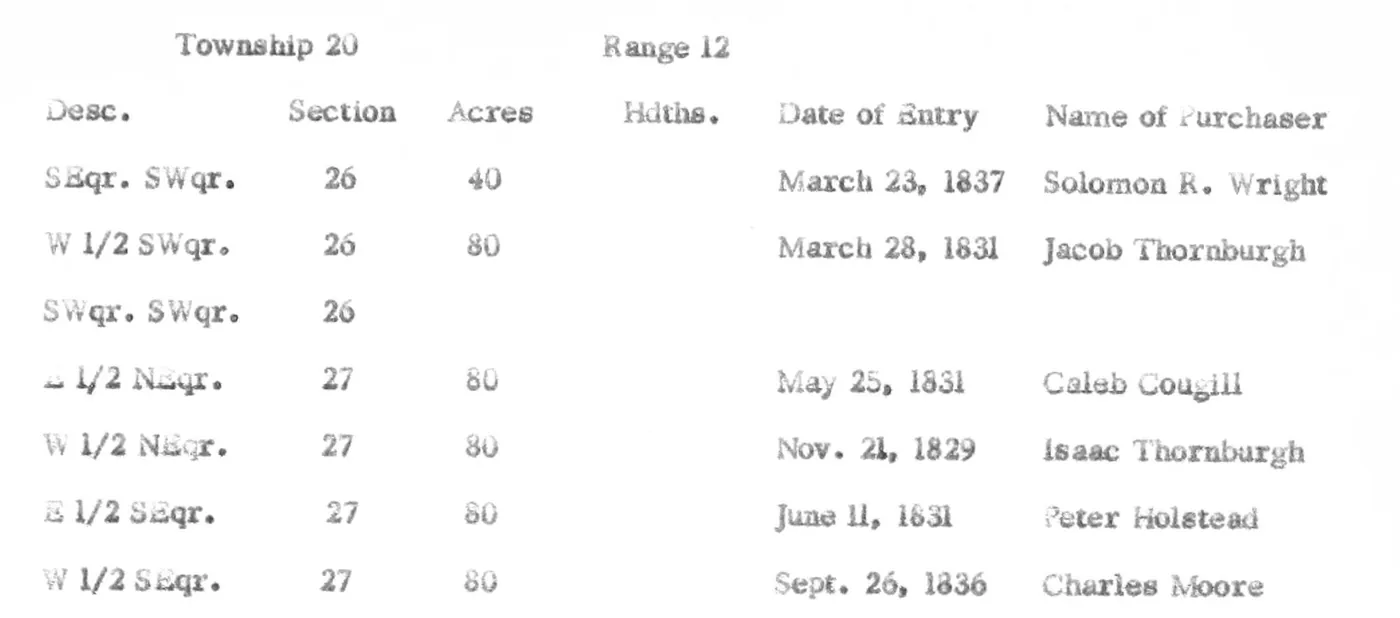
Grantor: United States
| Sec-Twp-Rge | Description | Grantee | Instrument |
|---|---|---|---|
| 26-20-12 | SE 1/4 SW 1/4 (40 ac) | Solomon R. Wright | Land entry, Mar 23, 1837 |
| 26-20-12 | W 1/2 SW 1/4 (80 ac) | Jacob Thornburgh | Land entry, Mar 28, 1831 |
| 27-20-12 | E 1/2 NE 1/4 (80 ac) | Caleb Cougill | Land entry, May 25, 1831 |
| 27-20-12 | W 1/2 NE 1/4 (80 ac) | Isaac Thornburgh | Land entry, Nov 21, 1829 |
We index tract books the way a plant uses them. Each entry is read, tied to the tract, and posted with the same rules as a recorded instrument.
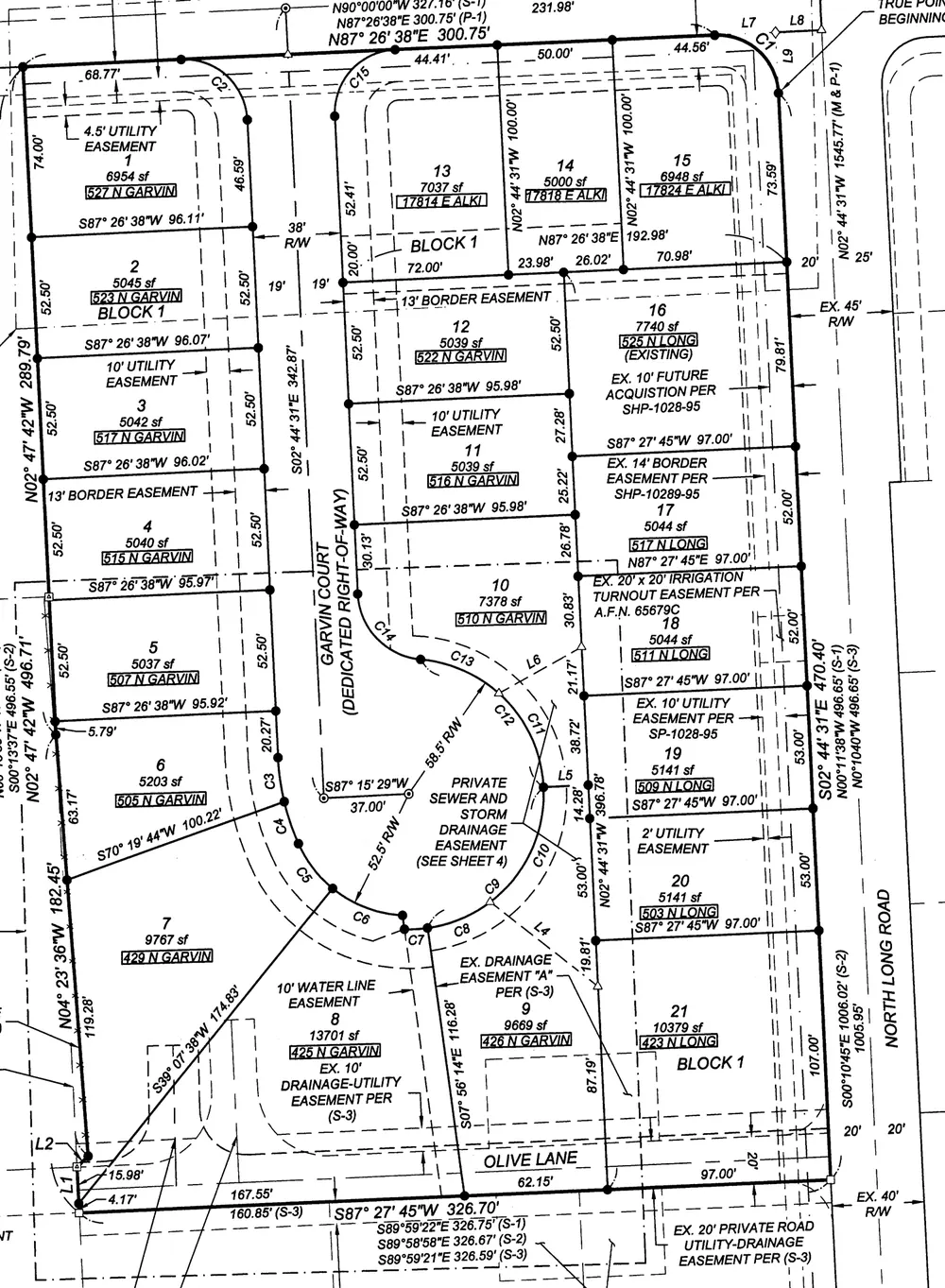 123456789101112131415161718192021Block 1
Land rules created: Lot 1-21, Block 1
The plat builder turns a scanned plat into land validation rules. Lot, block, and subdivision become checks the plant can run against every legal.
Human keyers format data as they type it. We format it after full extraction, using your plant's posting rules and your county's specs. Need a change? Update the rule and rerun it on the same extracted documents, as many times as you want, at no additional cost.
| Field | Raw extraction | Posted |
|---|---|---|
| Grantors | Margaret L. Ostrander | OSTRANDER, MARGARET L |
| Grantees | Daniel R. Whitcomb and Elena M. Whitcomb | WHITCOMB, DANIEL R AND ELENA M |
| Street address | 4418 E Harlow Ridge Ln, Spokane, WA 99223 | 4418 E HARLOW RIDGE LN, SPOKANE WA 99223 |
| Document number | 7999214 | 2026-7999214 |
| Consideration | 6215.00 | $6,215.00 |
| Document type | Statutory warranty deed | WD |
| Recorded | 10/01/2026 | 10/01/2026 |
Posted with this plant's rules: last name first, merged parties, document number with the year, consideration as currency. Rerun under another plant's rules and the same extraction comes back in that plant's shape.
Images can arrive the way your county already sends them. We keep our own working copy, so a retry or a moved file at the source does not break the batch.
PropertySync review batch
Records land for your team to check. When you are ready, they save into the plant. A review batch sent by mistake can be pulled back.
Straight to plant
The same PropertySync path, saving into the plant when your policy says the batch is clear.
TitleSearch
Industry-standard transmission, ready for pickup.
JSON
The full extracted record for every document.
File pickup
Pipe-delimited transmissions, custom field layouts, or a ZIP. Images and the index travel together as one multi-page TIFF per instrument.
Existing plant land is preserved when an instrument is already posted. For PropertySync customers, delivery lands in a review batch.
Full automation
County source to plant. Records above your bar deliver, and exceptions hold for review.
First pass for keyers
Your team opens records with type, parties, dates, recording data, and legals already filled in. They verify and correct instead of typing. Every correction is kept next to the original read.
Audit
Legal descriptions and the land base
Indexing a document is half the job. The other half is tying its legal description to the county's additions, abstracts, and surveys. The pipeline builds that land base, checks every posted legal against it, and recovers the legals that would otherwise be left blank.
A curated land base
Platted additions, Texas abstracts and surveys, and the section, township, and range grid. Harvested from the recorded documents and cleared by a person. Subdivision, abstract, and acreage are first-class fields.
Legals recovered
When a document only cites an earlier instrument, the pipeline follows the reference or the party chain, inherits the legal with a confidence score, and holds uncertain ones for review.
A locate report with every batch
Each legal comes back matched, resolved from a reference, or marked for a person.
New plants from the documents
Vocabulary and the land base come from the recorded documents themselves, for a backplant or a full county back-file.
Trust
If your plant or your customer raises a question about a posted document, you can answer it.
The same audit trail
Author, timestamp, confidence, and the original suggestion stay on the record.
Reproducible transmissions
The same source batch and the same pipeline version produce the same file, bit for bit.
Your confidence bar
You set it per county and per document type. Records under the bar hold for a person.
Parcel Watch
An alert when a deed, lien, or mortgage records against a parcel.
Explore Parcel Watch ›SubdivisionIQ
Plat and covenant search for your website, served from your plant.
Explore SubdivisionIQ ›FIRPTA
A documented FIRPTA answer on every closing file.
Explore FIRPTA ›Plant Health
A graded diagnostic for PropertySync go-forward customers.
Explore Plant Health ›For keying shops and resellers
Put TitleTools in front of your team. We run the first pass, cleanup, OCR and extraction, so your keyers review instead of type. White-label and wholesale options available.
Send us one day of recordings from your county. We'll run it through the pipeline and walk you through the results. A real person replies.
Excise $6,215.00 recorded 10/01/2026. Acknowledged in Spokane County on 09-29-2026.